Installation
Two ways in: a real pip install, or copy the folders directly. Both are fully supported.
Option A — pip install (recommended)
git clone https://github.com/Yashwanth-R19/rag-tool-curator.git
cd rag-tool-curator
pip install -e .
This installs tool_curator with its core dependencies only: sentence-transformers, faiss-cpu, rank-bm25, numpy. No web framework, no LLM SDK.
If you also want multilingual_normalizer’s Gemini backend:
pip install -e ".[normalizer]"
The normalizer extra adds google-genai. multilingual_normalizer’s abstract interface (BaseNormalizer, the get_normalizer factory, the English fast-path) has no dependency on it — you only need the extra if you actually instantiate GeminiNormalizer, or if you’re writing your own provider that happens to need it too.
from tool_curator import get_curator and from multilingual_normalizer import get_normalizer work with only the core install — installing or using one never pulls in the other's optional dependencies.
Option B — copy the folders
Both tool_curator/ and multilingual_normalizer/ are self-contained: no import reaches outside its own folder. Copy either (or both) directly into your project and install their dependencies manually:
pip install sentence-transformers faiss-cpu rank-bm25 numpy   # tool_curator
pip install google-genai                                     # multilingual_normalizer's Gemini backend
This is the right choice if you want the code vendored directly into your repo rather than tracked as an external dependency.
Requirements
- Python 3.10+
- No GPU required — all retrieval and the fast-path heuristic run on CPU. Only the optional Gemini translation call is a network request.
Running the bundled reference example
The example/ folder is a full reference deployment (a simulated university MCP system) used to validate both plug-ins end-to-end. It is not required to use either package — skip to Quickstart if you just want the plug-ins.
pip install -e ".[normalizer]"     # from the repo root — the example needs the Gemini extra
cd example
pip install -r requirements.txt    # MCP, Gemini SDK, pandas/openpyxl for the eval sheet, rich for the terminal UI
python main.py
You’ll be prompted for a persona (student / faculty / admin / executive) and a user ID, then dropped into an interactive session where every query prints the curator’s selection before the model responds.
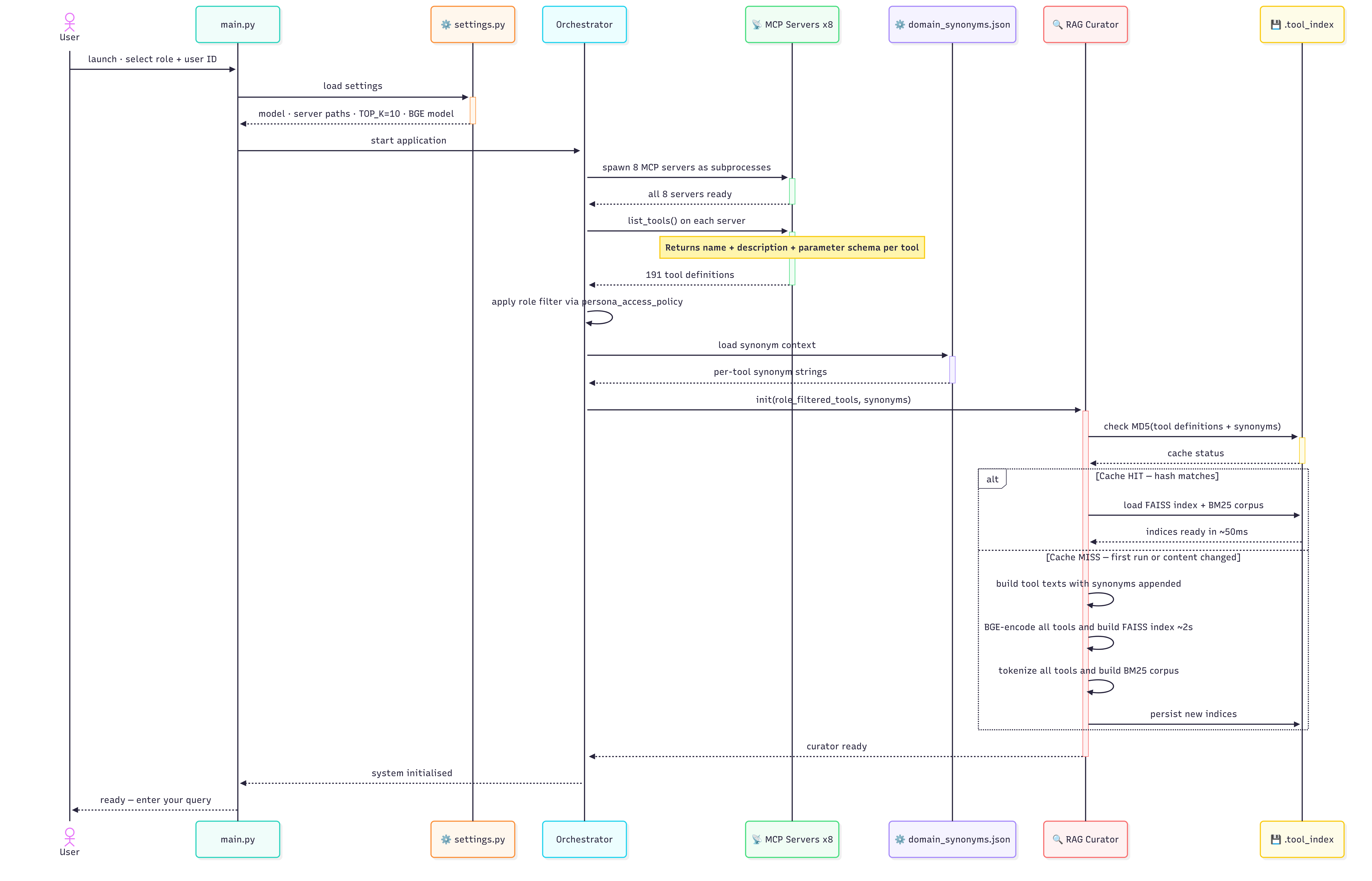
main.py and the first prompt: server startup, role filtering, and the curator's cache-hit/cache-miss index build.